

Start with today
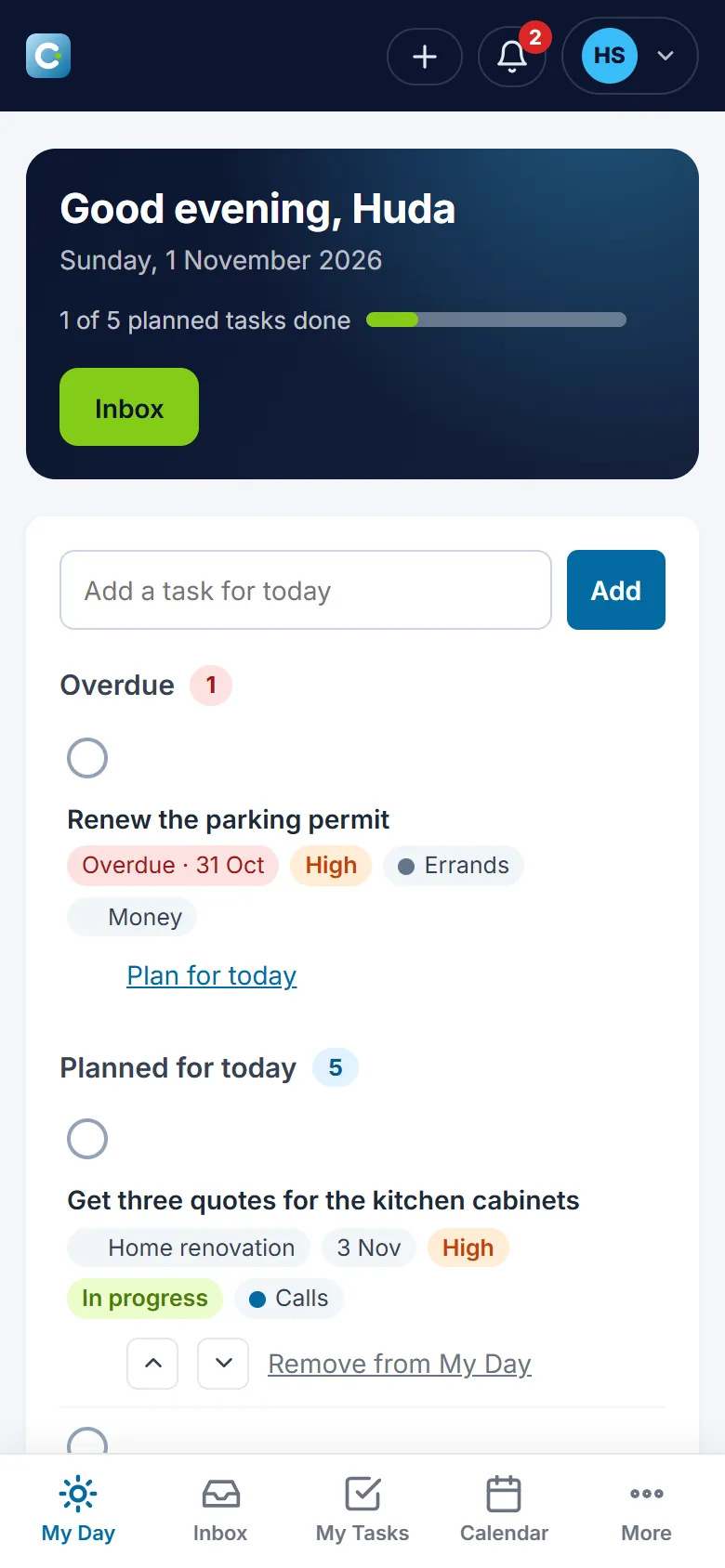
My Day shows what is overdue, what you planned for today and how much of it is done, in the order you choose.
Contralio Task · Personal productivity
Available
A task app for one person: plan the day in My Day, keep tasks with subtasks, projects and tags, see them on a calendar or a board, make them repeat, get reminded, and share a single task with someone when you need a hand.
Why it matters
Notes on the phone, a spreadsheet and a reminder app each hold part of what you meant to do. Task keeps all of it in one place and shows you only what matters today.
My Day shows what is overdue, what you planned for today and how much of it is done, in the order you choose.
The same tasks as a list, a board by status, a calendar by due date and a Completed log, with filters by priority, project and tag.
Due dates and times, reminders at the moment you pick, and a notice when something is due today or overdue, in the app and by email if you want.
Your tasks are your own. Share one task with one person by email when you need help; your projects, tags and planning stay private.
How it works
A simple routine that holds up on a busy day.
Add a task in two words from anywhere; it waits in the Inbox until you sort it.
Give it a project, a tag, a priority and a due date, and plan it for a day in My Day.
Tick off subtasks, attach a file, move it to In progress and complete it.
Make it come back daily, weekly, monthly or yearly; the next one appears when you complete or skip this one.
Invite someone to one task, assign it, and talk about it in the comments.
See what you completed, week by week, in Completed and Insights.
Key features
And nothing a team tool forces on you.
The tasks planned for today, the overdue ones, and a progress bar. Add a task for today in one line, reorder the list, and plan an overdue task for today with one click.
Title, description, status, priority from Low to Urgent, due date and time, subtasks to tick off, attachments such as PDF, Word, Excel and pictures, and a duplicate button for the next one like it.
Projects with a colour, a target date and a progress bar of tasks done; tags for the kind of work, like Errands or Calls. Both are yours only, never shown to anyone you share a task with.
Tasks on their due dates by month, week or day. Drag a task to another day to move its due date, and plan a task for a day straight from the calendar.
To do, In progress and Completed as columns. Drag a card to change its status, or use the links on the card when dragging is not handy, on a phone for example.
Daily, weekly on the days you choose, monthly on a date or the last day, or yearly, with an end date or a number of times. Only one open copy at a time; the next appears when you complete or skip it.
A reminder in three hours, tomorrow morning, on the due date or at any moment you pick, in the bell and by email if you want. Notices for tasks due today or overdue, each with its own switch.
Invite someone by email to a single task. They see the task, its subtasks and comments, can be assigned it and complete it, and every change is in the task's history. Leave or revoke at any time.
Tasks completed today, this week and per week, what is open and overdue. Export all your data as a file. Add the app to your phone's home screen and it opens like an app.
A closer look
Real screens from Contralio Task. Click any picture to see it full size.
Your tasks in three columns. Drag a card to change its status, or search and filter to find one.
Every task on its due date, with the time when it has one and a mark for shared tasks.
Everything about one task: its details, a reminder, a repeat rule, subtasks, attachments and sharing.
Comments between the two of you and a history of every change, on the task itself.
Group tasks by goal and see how far each one has come.
Your day in your pocket: add a task the moment you think of it and tick it off when it is done.
Security and privacy
Task is built on the same foundations as the Contralio business applications, for one person's data.